Compute Resources
Do not run computations on the login nodes.
The compute resources described on this page are designed for handling computationally intensive tasks, but the login nodes are not.
You may also be interested in these pages:
- Standard Practices - important policies, recommendations, and helpful tips
- Running Jobs - how to run your work on the HPC
- Frequently Asked Questions - solutions to common issues
Compute Resources Available by Cluster
The New Cat: Lynx
We are in the process of acquiring a new computing cluster, Lynx. Information on the coming hardware is included in the tables below. This cluster is not available yet. We will notify the community as we get closer to its release
Below is a list of the node types and physical hardware that are available on each cluster. These can be used as a reference when submitting jobs to the system to ensure you are targeting the correct machines and getting the computational resources you need.
Requesting resources in jobs
For information on the specifics of requesting the compute resources detailed below, see our Batch Jobs, Interactive Jobs, and/or Open OnDemand Jobs guides.
Node Types
| Node Type | Description |
|---|---|
| Standard CPU Node | This is the general purpose node, designed to be used by the majority of jobs. |
| High Memory CPU Node | Similar to the standard nodes, but with significantly more RAM. There a only a few of them and they should only be requested for jobs that are known to require more RAM than is provided by standard CPU nodes. |
| GPU Node | Similar to the standard node, but with one or more GPUs available. The number of GPUs available per node is cluster-dependent. |
| Buy-in Node | Nodes that have been purchased by research groups as part of our buy-in process. Buy-in nodes are only accessible to high priority and windfall jobs. |
Available Hardware by Cluster and Node Type
CPUs and Memory
For information on memory to CPU ratios, shown as RAM/CPU in the tables below, see CPUs and Memory
Resources Available
| Node Type | Number of Nodes |
CPUs/Node | RAM/CPU | CPU RAM/Node | GPUs/Node | RAM/GPU |
GPU RAM/Node | Total GPUs |
|---|---|---|---|---|---|---|---|---|
| Standard | 40 standard 15 buy-in |
192 | 4 GB | 768 GB | - | - | - | - |
| High Memory | 1 standard 0 buy-in |
94 | 32 GB | 3008 GB | - | - | - | - |
| GPU | 2 standard 3 buy-in |
94 | 5 GB | 1536 GB | 8 | 141 GB/H200 | 1128 GB | 16 standard 24 buy-in |
Resources Available
| Node Type | Number of Nodes |
CPUs/Node | RAM/CPU | CPU RAM/Node | GPUs/Node | RAM/GPU |
GPU RAM/Node | Total GPUs |
|---|---|---|---|---|---|---|---|---|
| Standard | 192 standard 108 buy-in |
94 | 5 GB | 470 GB | - | - | - | - |
| High Memory | 3 standard 2 buy-in |
94 | 32 GB | 3008 GB | - | - | - | - |
| GPU | 9 standard 6 buy-in |
94 | 5 GB | 470 GB | 4 | 32 GB (v100s) 20 GB (MIGs) |
128 GB | 36 standard 24 buy-in |
GPU Nodes
There are 8 H200s in both of the GPU nodes.
Lynx may have MIG provisioned on the GPUs, depending on the results of our tests.The GPUs would be subdivided into two virtual GPUs using the Nvidia MIG (Multi-Instance GPU) method. Each of these MIG slices allows the use of 70 GB of GPU memory.
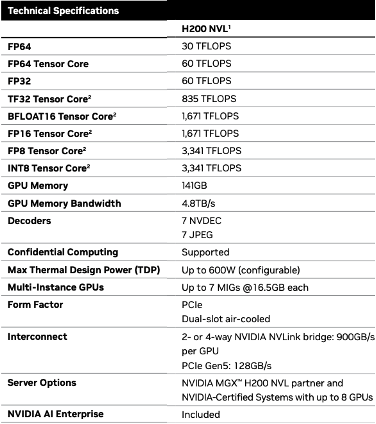
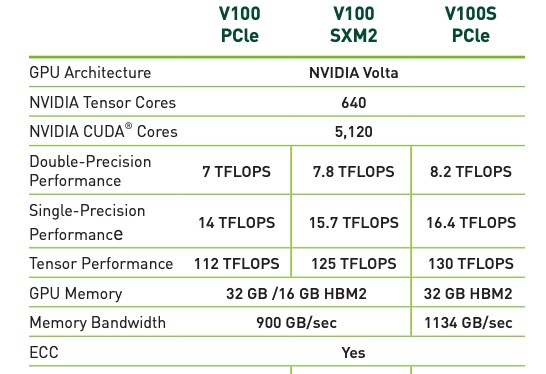 There are 4 V100S's in each of the 9 Puma nodes. Lynx will have 8 H200's in each node.
On Puma, one node has four A100s, each subdivided into two smaller virtual GPUs. See the MIG (Multi-instance GPU) Resources section below for details. We may implement this on Lynx.
Multi-Instance GPU (MIG) Resources
The Four A100 GPUs on Puma Node r7u25n1 are each subdivided into two smaller virtual GPUs using the Nvidia MIG (Multi-Instance GPU) method. Each of these MIG slices allows the use of 40 GB of GPU memory. The increased VRAM enables workloads requiring more memory than the V100 GPUs.
A limitation is that only one MIG slice can be addressed by a single application, so MIG slices are not appropriate for jobs utilizing multiple GPUs.
The addition of the MIG devices to the Slurm queues will have a number of impacts, and some users may need to make changes to submissions to ensure proper functioning of analyses.
To see the proper syntax for requesting a MIG slice versus a V100, please see our page on Batch Directives.
System Technical Specifications
These counts include the buy-in high priority nodes
| Lynx | Puma | |
|---|---|---|
| Model | Lenovo V3 Servers | Penguin Altus XE2242 |
| Year Purchased | 2026 | 2020 |
| Node Count | 55 CPU-only 5 GPU 1 High Memory |
300 CPU-only 15 GPU 5 High Memory |
| Total System Memory | 41.4 TB | 169.7 TB |
| Processors | 2x AMD 9655 96-core (Turin) 2x AMD 9455 48-core (Turin) 2x AMD 9455 48-core (Turin) |
2x AMD EPYC 7642 48-core (Rome) |
| Cores/Node (Schedulable) | 192 | 94 |
| Total Cores | 11136 | 307201 |
| Processor Speed | 2.66 GHz 3.15GHz |
2.4 GHz |
| Memory/Node | 768 GB 3 TB - High memory |
512 GB (3 TB - High-memory) |
| Accelerators | 40 NVIDIA H200 | 56 NVIDIA V100S 8 A100 40 GB MIG slices |
| /tmp2 | ~1.9 TB NVMe | ~1.9 TB NVMe |
| OS | Rocky Linux 9 | Rocky Linux 9 |
| Interconnect | NDR Inifiniband for MPI 25 Gb Ethernet |
1x 25 Gb/s Ethernet RDMA (RoCEv2) 1x 25 Gb/s Ethernet to storage |